✓
One employee credential record
Store licences and professional certifications beside the person they belong to.
- Issuing body and certificate number
- Issue and expiry dates
- Optional supporting attachment
Keep licences, certifications, issuing bodies, reference numbers and supporting files beside the employee record — with clear expiry status for HR.
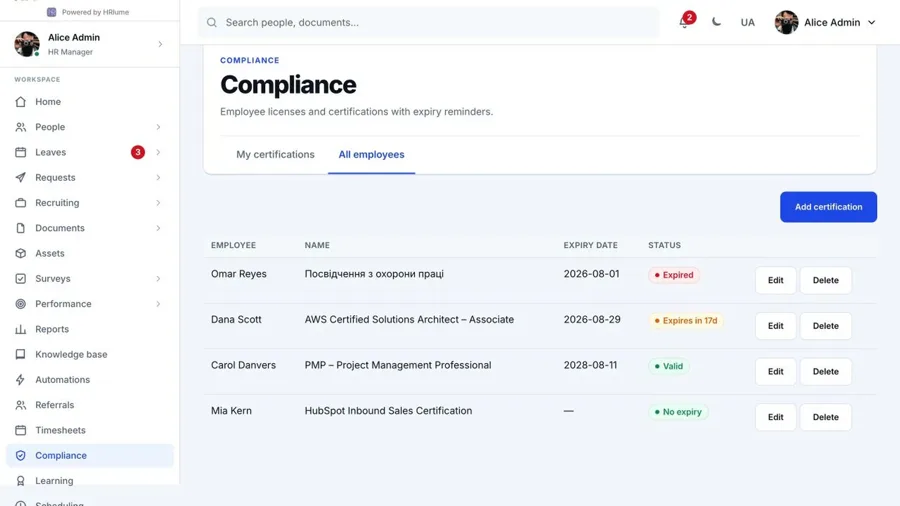
Employees can see their own credentials, while authorised HR roles manage the company-wide register.
Every record can include the issuer, certificate number, issue and expiry dates, plus a supporting file stored with the record.
HRlume turns dates into an operational view that is easy to review and maintain.
Store licences and professional certifications beside the person they belong to.
Separate valid, expiring soon, expired and no-expiry credentials without manual calculations.
People have a focused view of their own certifications without access to the wider register.
Only administrators and roles with explicit compliance permissions can manage company records.
Attach the certificate file so HR can verify the record without searching another drive.
Keep credential status connected to the employee record.
Start your free workspaceYou set the warning windows yourself, as a list of day counts before expiry — HRlume ships with a sensible default set, but HR can add, remove or change thresholds to match how far ahead your organisation likes to plan renewals.
Reminders run automatically once a day, so a certification never quietly expires unnoticed between manual reviews.
Both. An employee can see their own certification record; managing everyone else's records is limited to HR and anyone explicitly given that permission.
Name, issuing body, certificate number, issue date, expiry date, and an optional evidence file — enough to answer an audit question without leaving HRlume.