Purpose-built endpoints
Read and write leaves, assets, recruiting, document metadata, surveys, goals and knowledge — versioned under /api/integrations/v1.
Authenticate with a scoped API key to read or safely update assets, recruiting, document metadata, surveys, goals and knowledge data in your own HRlume instance.
Read and write leaves, assets, recruiting, document metadata, surveys, goals and knowledge — versioned under /api/integrations/v1.
Every key has an editable purpose, lifetime, optional IP allowlist and independent read/write scopes — nothing inherited by default.
Every endpoint on this page ships with a ready-to-run request and response example — no separate Postman collection to keep in sync.
The API key editor makes the security boundary visible: purpose, expiry, IP restrictions and read/write scopes are selected independently, with clear warnings on sensitive permissions.
Open API key settings →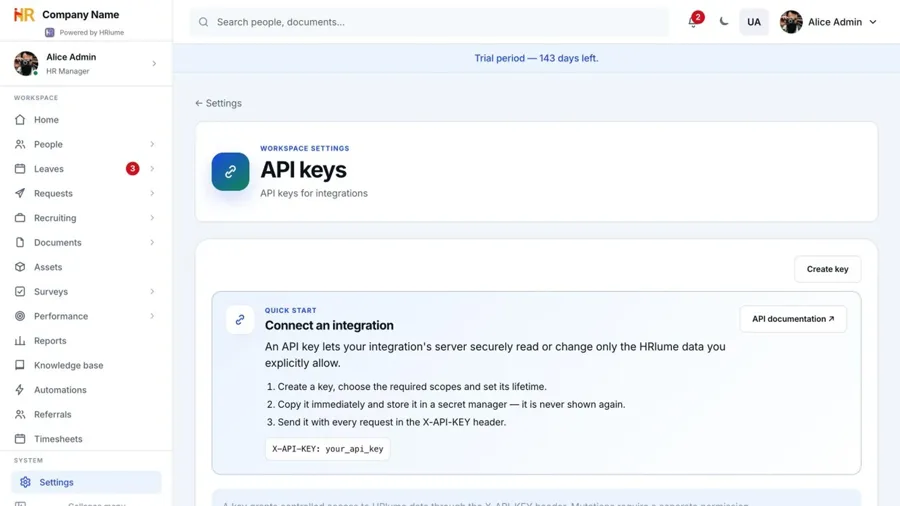
Search by resource, path, scope or capability, then narrow the results by HTTP method.
Try another resource name, scope or HTTP method.
HRlume does not use one shared multi-tenant API origin. Replace the sample host below with the origin of your own hosted or dedicated HRlume instance.
https://app.yourcompany.comcurl "https://app.yourcompany.com/api/employees?paginate=1&limit=20" \
-H "X-API-KEY: your_api_key"Create keys in Settings → Security → API keys inside your HRlume instance. The raw token is shown once. Store it in a secret manager and never place it in browser code or a public repository.
Choose a clear purpose for each key — third-party service, analytics/BI, process automation, personal use or a custom Ukrainian/English label — so administrators can identify it later. The name, purpose, lifetime, IP allowlist and scopes can be edited without rotating the secret token. Purpose is descriptive; access is controlled by the selected scopes.
X-API-KEY: your_api_keyAuthorization: Bearer your_api_keySet a specific expiry date for temporary integrations, or choose unlimited for long-running connections. Optional IP allowlists can further restrict a key to requests coming from known integration servers.
Select only the scopes an integration needs. For backward compatibility, a legacy key with no stored scopes gets all read scopes, but it never receives write access automatically.
| Scope | Resource |
|---|---|
employees:read | Employees |
departments:read | Departments |
teams:read | Teams and team members |
leaves:read | Leave requests |
assets:read | Company assets |
assets:write | Create and update company assets |
recruiting:read | Jobs and candidates |
recruiting:write | Create and update jobs and candidates |
documents:read | Document metadata |
documents:write | Create and update document metadata |
surveys:read | Survey metadata and aggregate counts |
surveys:write | Create and update draft surveys |
goals:read | Goals and OKRs |
goals:write | Create and update goals and OKRs |
knowledge:read | Knowledge-base articles |
knowledge:write | Create and update knowledge-base articles |
Use POST on a collection to create a record and PUT on /{id} to update only the fields you send. Successful mutations return the saved record in { "data": { ... } }; creation returns HTTP 201.
Write scopes can change personal or business-critical data. HRlume highlights sensitive scopes in the key editor. Use a dedicated short-lived key, restrict it by IP and never grant write access to reporting-only integrations.
API keys cannot delete records, upload files, launch surveys, submit survey responses or approve leave. Employee, department, team and leave-request mutations stay unavailable because those flows require additional HR business rules.
curl -X POST "https://app.yourcompany.com/api/integrations/v1/assets" \
  -H "X-API-KEY: your_api_key" \
  -H "Content-Type: application/json" \
-d '{"code":"LT-1042","name":"MacBook Pro","serialNumber":"C02..."}'Use limit and offset. The default limit is 50 and the maximum is 200.
{
  "data": [{ "id": "resource-id" }],
  "pagination": {
    "limit": 50,
    "offset": 0,
    "total": 128
  }
}Keep the instance URL and API key in environment variables. The following examples use only standard platform features, so you can start without an SDK.
HRLUME_URL=https://app.yourcompany.com · HRLUME_API_KEY=your_api_keyContinue until the current offset reaches the total returned by the API.
const baseUrl = process.env.HRLUME_URL;
const apiKey = process.env.HRLUME_API_KEY;
const employees = [];
let offset = 0;

while (true) {
  const url = new URL("/api/employees", baseUrl);
  url.search = new URLSearchParams({ paginate: "1", limit: "100", offset });

  const response = await fetch(url, {
    headers: { "X-API-KEY": apiKey }
  });
  if (!response.ok) throw new Error(`HRlume API ${response.status}`);

  const page = await response.json();
  employees.push(...page.data);
  offset += page.data.length;
  if (offset >= page.pagination.total || page.data.length === 0) break;
}

console.log(`Loaded ${employees.length} employees`);Use filters and pagination together, then write the selected fields to CSV.
import csv, json, os, urllib.parse, urllib.request

base = os.environ["HRLUME_URL"].rstrip("/")
key = os.environ["HRLUME_API_KEY"]
rows, offset = [], 0

while True:
    query = urllib.parse.urlencode({
        "status": "approved", "from": "2026-01-01",
        "limit": 200, "offset": offset,
    })
    request = urllib.request.Request(
        f"{base}/api/integrations/v1/leave-requests?{query}",
        headers={"X-API-KEY": key},
    )
    with urllib.request.urlopen(request) as response:
        page = json.load(response)
    rows.extend(page["data"])
    offset += len(page["data"])
    if offset >= page["pagination"]["total"] or not page["data"]:
        break

with open("approved-leave.csv", "w", newline="") as output:
    fields = ["employeeEmail", "startDate", "endDate", "totalDays"]
    writer = csv.DictWriter(output, fieldnames=fields, extrasaction="ignore")
    writer.writeheader()
writer.writerows(rows)Do not retry authorization, scope or validation errors automatically. Log the status and API error code without logging the secret key.
const response = await fetch(`${process.env.HRLUME_URL}/api/integrations/v1/assets`, {
  headers: { "X-API-KEY": process.env.HRLUME_API_KEY }
});
const payload = await response.json();

if (!response.ok) {
  console.error("HRlume request failed", {
    status: response.status,
    error: payload.error
  });
  process.exitCode = 1;
} else {
  console.log(payload.data);
}/api/employeesReturns company employees. Add paginate=1 to enable limit/offset pagination.
1employees:read/api/departmentsReturns all departments with manager, parent and live active headcount information.
departments:read/api/teamsReturns each team with its manager and embedded member summaries. Use employeeId to return only teams containing one employee.
/api/teams/{team_id}Returns one team in the same shape.
teams:read/api/integrations/v1/leave-requestsReturns leave periods with employee, leave-type and approver summaries. Private notes and rejection details are excluded.
curl "https://app.yourcompany.com/api/integrations/v1/leave-requests?status=approved&from=2026-01-01" \
-H "X-API-KEY: your_api_key"leaves:read/api/integrations/v1/assetsReturns equipment, assignment, category, value, location and warranty metadata.
/api/integrations/v1/assetsCreate an unassigned asset. Requires code and name.
/api/integrations/v1/assets/{id}Update asset identity and inventory metadata. Assignment actions are not exposed.
assets:readassets:write/api/integrations/v1/documentsReturns names, types, folders, scope and expiry dates. File contents, R2 object keys and storage URLs are not exposed.
/api/integrations/v1/documentsCreate metadata for an external URL. File upload and R2 object access are not exposed.
/api/integrations/v1/documents/{id}Update name, type, URL, employee, folder, scope or expiry date.
curl -X POST "$HRLUME_URL/api/integrations/v1/documents" \
  -H "X-API-KEY: $HRLUME_API_KEY" \
  -H "Content-Type: application/json" \
  -d '{
    "name": "Remote work policy",
    "type": "policy",
    "url": "https://company.example/policies/remote-work.pdf",
    "scope": "company",
    "expiryDate": "2027-12-31"
}'documents:readdocuments:write — sensitive/api/integrations/v1/knowledgeReturns bilingual titles, categories and article bodies with author summaries.
/api/integrations/v1/knowledgeCreate a bilingual article. title is required.
/api/integrations/v1/knowledge/{id}Update title, category or body in Ukrainian/base and English variants.
curl -X POST "$HRLUME_URL/api/integrations/v1/knowledge" \
  -H "X-API-KEY: $HRLUME_API_KEY" \
  -H "Content-Type: application/json" \
  -d '{
    "title": "Віддалена робота",
    "titleEn": "Remote work",
    "category": "Політики",
    "categoryEn": "Policies",
    "body": "Правила та рекомендації для команди.",
    "bodyEn": "Rules and guidance for the team."
}'knowledge:readknowledge:write/api/integrations/v1/jobsReturns vacancies with bilingual content, department, salary range and candidate counts.
/api/integrations/v1/jobsCreate a vacancy. title is required.
/api/integrations/v1/jobs/{id}Update vacancy content, status, department, salary and public metadata.
curl -X POST "$HRLUME_URL/api/integrations/v1/jobs" \
  -H "X-API-KEY: $HRLUME_API_KEY" \
  -H "Content-Type: application/json" \
  -d '{
    "title": "Backend-розробник",
    "titleEn": "Backend Engineer",
    "location": "Remote · Ukraine",
    "type": "full-time",
    "status": "open",
    "salaryMin": 3500,
    "salaryMax": 5000,
    "currency": "USD",
    "hot": true
}'recruiting:readrecruiting:write — sensitive/api/integrations/v1/candidatesReturns candidate contact details and current pipeline state. CV files, internal notes and scorecard details are excluded.
/api/integrations/v1/candidatesCreate a candidate for an existing jobId.
/api/integrations/v1/candidates/{id}Update contact, source, assignee, rating or pipeline stage.
curl -X POST "$HRLUME_URL/api/integrations/v1/candidates" \
  -H "X-API-KEY: $HRLUME_API_KEY" \
  -H "Content-Type: application/json" \
  -d '{
    "jobId": "job_uuid",
    "firstName": "Olena",
    "lastName": "Koval",
    "email": "olena@example.com",
    "source": "Referral",
    "stage": "applied"
}'recruiting:readrecruiting:write — sensitive/api/integrations/v1/surveysReturns survey metadata plus question and response counts. Individual answers and respondent identities are never exposed.
/api/integrations/v1/surveysCreate a draft survey. title is required.
/api/integrations/v1/surveys/{id}Update bilingual content and anonymity only while the survey is a draft.
curl -X POST "$HRLUME_URL/api/integrations/v1/surveys" \
  -H "X-API-KEY: $HRLUME_API_KEY" \
  -H "Content-Type: application/json" \
  -d '{
    "title": "Настрій команди",
    "titleEn": "Team mood",
    "introText": "Поділіться, як минув ваш тиждень.",
    "introTextEn": "Tell us how your week went.",
    "anonymous": true
}'surveys:readsurveys:write — sensitive/api/integrations/v1/goalsReturns company, team and employee goals with metric values, weights, periods and progress inputs.
/api/integrations/v1/goalsCreate a company, team or employee goal. title and ownerType are required.
/api/integrations/v1/goals/{id}Update content, metric values, status, due date or period. Ownership cannot be moved by update.
curl -X PUT "$HRLUME_URL/api/integrations/v1/goals/goal_uuid" \
  -H "X-API-KEY: $HRLUME_API_KEY" \
  -H "Content-Type: application/json" \
  -d '{
    "currentValue": 72,
    "status": "active",
    "dueDate": "2026-09-30"
}'goals:readgoals:write| Status | Error | Meaning |
|---|---|---|
401 | unauthorized | Missing, invalid, expired, revoked or IP-restricted key. |
403 | forbidden | The key does not include the required scope. |
403 | product_not_licensed | The HRlume product module is not active for this instance. |
404 | not_found | Unknown endpoint or resource. |
405 | method_not_allowed | The method is unsupported. Integration endpoints accept GET, POST and PUT only where documented. |
409 | conflict | The requested mutation conflicts with current data or state, such as editing a running survey. |
We expand the API around real workflows while keeping employee data access explicit and auditable.